14 May 2026 • 10 Minutes Read
Written by Elore Digital Team
A Scalable Design System for Multi-Page Websites
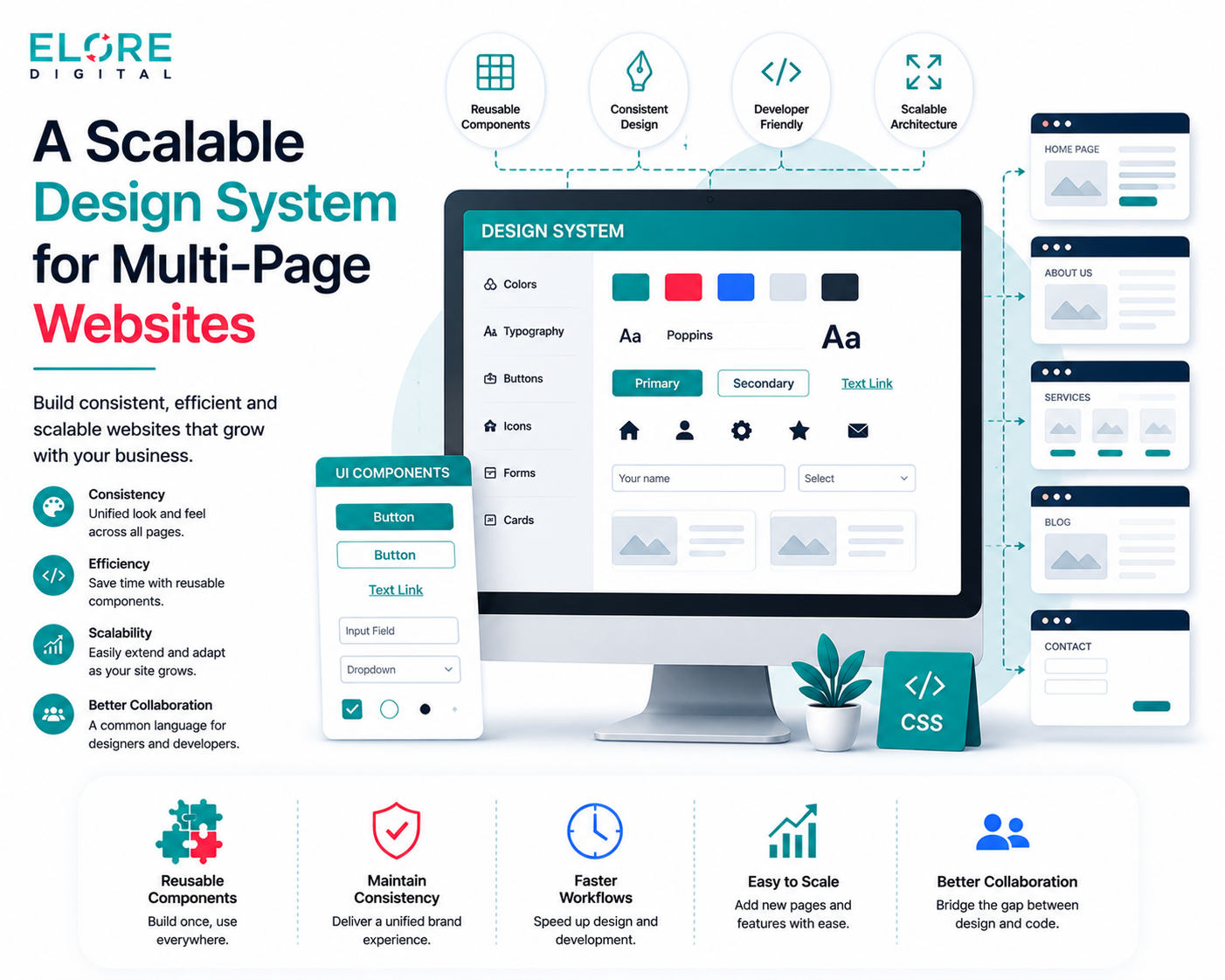
A Scalable Design System for Multi-Page Websites — build consistent, efficient, and future-ready websites with reusable components and streamlined workflows
A scalable design system provides a structured approach to building consistent and efficient multi page websites. It allows teams to reuse components, maintain visual consistency, and reduce development time. By following clear guidelines and organised patterns, it becomes easier to manage updates and add new features. This approach ensures long term growth while maintaining quality and user experience.
1. Understanding Design Systems
A design system is a structured collection of reusable components, guidelines, and standards that help teams build consistent digital products. It acts as a single source of truth for both designers and developers, ensuring that every page follows the same visual and functional rules. For multi page websites, this becomes even more important because consistency across different pages directly affects user experience. Without a design system, teams often face confusion, repeated work, and inconsistent layouts. A well defined system reduces these issues and speeds up the workflow. It also makes it easier to maintain and update the website over time.
1.1 What is a Design System
A design system is more than just a style guide. It includes components, patterns, and rules that define how a product should look and behave. It brings together colours, typography, layouts, and interactions into one organised system. This helps teams avoid making design decisions from scratch every time. Instead, they can rely on predefined elements that are already tested and approved. Over time, it becomes a reliable foundation for building new pages and features.
1.2 Importance in Modern Web Development
Modern websites are more complex than ever, often containing dozens or even hundreds of pages. A design system helps manage this complexity by providing clear direction. It ensures that every page looks and feels connected, which builds trust with users. Developers can work faster because they do not need to guess how something should be built. Designers can focus more on solving user problems instead of repeating the same designs. This improves both efficiency and quality.
1.3 Key Components of a Design System
A design system usually includes visual styles, UI components, layout rules, and documentation. Visual styles cover colours, fonts, and spacing. Components include buttons, forms, and navigation elements. Layout rules define how content should be structured across pages. Documentation explains how to use everything correctly. Together, these elements create a complete system that supports both design and development.
1.4 Benefits for Multi Page Websites
Multi page websites require strong consistency to provide a smooth user experience. A design system ensures that users do not feel lost when moving between pages. It also reduces development time because components can be reused instead of rebuilt. Updates become easier since changes can be applied across the entire system. This leads to better scalability and long term maintenance. Overall, it improves both user satisfaction and team productivity.
2. Core Principles of Scalable Design
Scalable design focuses on creating systems that can grow without losing quality or consistency. It ensures that as new pages or features are added, the overall structure remains strong and organised. This requires careful planning and clear guidelines from the beginning. Teams must think beyond immediate needs and consider future expansion. A scalable approach saves time and effort in the long run. It also helps avoid redesigning large parts of the website later.
2.1 Consistency Across Pages
Consistency is one of the most important principles in design. Users should feel familiar with the interface no matter which page they visit. This includes using the same colours, fonts, and layouts. Consistent design reduces confusion and improves usability. It also strengthens the brand identity. A design system makes it easier to maintain this consistency across all pages.
2.2 Reusability of Components
Reusable components are the building blocks of a scalable design system. Instead of creating new elements each time, teams can reuse existing ones. This saves time and ensures uniformity. It also reduces the chances of errors or inconsistencies. Components can be updated once and used everywhere. This approach is both efficient and practical for
scaling websites.
2.3 Flexibility and Adaptability
A good design system should be flexible enough to handle different types of content and layouts. It should allow teams to adapt without breaking the overall structure. Flexibility ensures that the system remains useful as the website evolves. It also supports creative solutions while maintaining consistency. This balance is key to long term success.
2.4 Performance Considerations
Scalability is not just about design, it also includes performance. A well structured system helps reduce unnecessary code and improves loading speed. Reusable components make development more efficient and lightweight. Faster websites provide a better user experience and improve search rankings. Performance should always be part of the design process.
3. Building a Strong Visual Foundation
A strong visual foundation defines how a website looks and feels. It includes colours, typography, spacing, and imagery. These elements create a cohesive identity that users can recognise. A clear visual system makes it easier to design new pages quickly. It also ensures that every part of the website feels connected. Without a solid foundation, designs can become inconsistent and confusing.
3.1 Colour Systems and Branding
Colours play a major role in branding and user experience. A design system defines primary, secondary, and neutral colours. This ensures that colours are used consistently across all pages. It also helps create a strong visual identity. Proper use of colour improves readability and guides user attention. A well planned colour system makes design decisions easier.
3.2 Typography Guidelines
Typography affects how content is read and understood. A design system defines font styles, sizes, and spacing. This ensures that text is clear and consistent. Good typography improves readability and user experience. It also supports the overall design style. Clear guidelines help maintain uniformity across all pages.
3.3 Spacing and Layout Rules
Spacing helps organise content and improve clarity. A design system defines consistent spacing rules for margins and padding. This creates a balanced and clean layout. Proper spacing makes content easier to scan and understand. It also improves the overall visual structure. Consistent layouts make the website feel more organised.
3.4 Iconography and Imagery
Icons and images support communication and enhance design. A design system defines how they should be used. This includes style, size, and placement. Consistent visuals help users understand content quickly. They also improve the overall look of the website. Clear guidelines ensure that visuals remain aligned with the brand.
4. Creating Reusable UI Components
Reusable UI components are essential for building scalable websites. They allow teams to create consistent elements that can be used across different pages. This reduces duplication and saves time. Components also make it easier to maintain and update the website. A well organised component library improves both design and development efficiency. It ensures that every part of the website follows the same standards.
4.1 Buttons and Form Elements
Buttons and forms are key interaction elements. A design system defines their styles, sizes, and behaviour. This ensures that users can interact with the website easily. Consistent design improves usability and accessibility. Clear guidelines help developers implement them correctly. This leads to a smoother user experience.
4.2 Navigation Menus
Navigation helps users move through the website. A design system ensures that menus are clear and consistent. This includes layout, style, and interaction patterns. Good navigation improves usability and reduces confusion. It also helps users find information quickly. Consistency across pages is important for a seamless experience.
4.3 Cards and Content Blocks
Cards and content blocks help organise information. They provide a structured way to display content. A design system defines how these elements should look and behave. This ensures consistency across different sections. Well designed blocks improve readability and engagement. They also make layouts more flexible.
4.4 Modals and Alerts
Modals and alerts are used to communicate important information. A design system defines when and how to use them. This ensures that they are clear and not overwhelming. Consistent design helps users understand their purpose. Proper use improves user experience and interaction. Clear guidelines prevent misuse.
5. Structuring Layouts for Multi Page Websites
Layouts define how content is arranged on each page. A scalable system ensures that layouts are consistent and flexible. This helps maintain a clear structure across the website. Good layouts improve readability and user flow. They also support different types of content. A strong layout system is essential for multi page websites.
5.1 Grid Systems
Grid systems provide a framework for arranging content. They ensure alignment and consistency. A design system defines grid rules for different screen sizes. This helps create balanced layouts. Grids make design more organised and predictable. They are a key part of scalable design.
5.2 Page Templates
Templates provide a starting point for different pages. They define common structures and layouts. This saves time and ensures consistency. Teams can use templates to create new pages quickly. It also reduces design errors. Templates support efficient workflow.
5.3 Responsive Layouts
Responsive design ensures that websites work on all devices. A design system defines how layouts should adapt. This includes breakpoints and scaling rules. Responsive layouts improve accessibility and usability. They provide a consistent experience across devices. This is essential for modern websites.
5.4 Content Hierarchy
Content hierarchy helps users understand information. It defines the order and importance of elements. A design system uses typography and spacing to create hierarchy. This improves readability and navigation. Clear structure helps users find information easily. It also enhances overall experience.
6. Design Tokens and Variables
Design tokens store visual values such as colours, fonts, and spacing. They make it easier to manage design decisions. Tokens ensure consistency across different platforms and tools. They also simplify updates and changes. A well organised token system supports scalability. It helps teams maintain a unified design language.
6.1 What are Design Tokens
Design tokens are small pieces of data that represent design values. They store information like colour codes and font sizes. This allows teams to use consistent values across projects. Tokens act as a bridge between design and development. They improve accuracy and efficiency. This makes them an important part of design systems.
6.2 Managing Colours and Fonts
Tokens help manage colours and fonts in a structured way. Changes can be made in one place and applied everywhere. This saves time and reduces errors. It also ensures consistency across all pages. Proper management improves workflow. It keeps the design system organised.
6.3 Token Naming Conventions
Clear naming conventions are important for design tokens. Names should be simple and easy to understand. This helps teams use tokens correctly. Consistent naming improves communication between designers and developers. It also makes the system easier to maintain. Good naming practices support scalability.
6.4 Tools for Token Management
There are many tools available for managing design tokens. These tools help organise and update values efficiently. They also support integration with design and development workflows. Using the right tools improves productivity. It ensures that tokens are used correctly. This supports a scalable system.
7. Documentation and Guidelines
Documentation is a key part of any design system. It explains how to use components and follow guidelines. Clear documentation helps teams work more efficiently. It reduces confusion and errors. A well documented system is easier to maintain. It also supports collaboration across teams.
7.1 Writing Clear Documentation
Documentation should be simple and easy to understand. It should explain how and when to use components. Clear examples help users follow guidelines. Good documentation improves usability. It also supports faster onboarding. This is important for growing teams.
7.2 Usage Instructions for Components
Each component should have clear usage instructions. This includes behaviour, states, and variations. Instructions help ensure correct implementation. They also reduce inconsistencies. Clear guidelines improve design quality. They support better development practices.
7.3 Do’s and Don’ts
Do’s and don’ts provide clear rules for using components. They help teams avoid common mistakes. This improves consistency and quality. Simple examples make guidelines easier to follow. They also support better decision making. Clear rules are important for scalable systems.
7.4 Maintaining Consistency
Consistency requires regular updates and reviews. Teams should monitor how components are used. This helps identify issues and improvements. Regular updates keep the system relevant. It also ensures that guidelines are followed. Consistency supports a better user experience.
8. Collaboration Between Teams
Collaboration is essential for a successful design system. Designers and developers need to work together closely. Clear communication helps avoid misunderstandings. A shared system improves teamwork and efficiency. It also ensures that designs are implemented correctly. Collaboration supports better results.
8.1 Designers and Developers Workflow
A clear workflow helps teams work efficiently. Designers create components and developers implement them. Regular communication ensures alignment. This reduces errors and delays. A shared system improves coordination. It supports smooth development.
8.2 Version Control Practices
Version control helps manage changes in the design system. It allows teams to track updates and maintain history. This ensures stability and reliability. Proper version control reduces risks. It also supports collaboration. Teams can work with confidence.
8.3 Feedback and Iteration
Feedback is important for improving the design system. Teams should review and update components regularly. This helps identify issues and improve quality. Iteration supports continuous improvement. It ensures that the system stays relevant. Regular feedback leads to better results.
8.4 Cross Team Communication
Communication between teams is essential. It ensures that everyone understands the system. Clear communication reduces confusion and errors. It also supports collaboration. Teams can work more efficiently. This improves overall productivity.
9. Scaling and Maintaining the System
Scaling a design system requires continuous effort. Teams need to update and improve components regularly. Maintenance ensures that the system remains effective. A scalable system supports growth without losing quality. It also reduces long term costs. Proper management is essential.
9.1 Updating Components Efficiently
Components should be easy to update. Changes should apply across all pages. This saves time and effort. Efficient updates improve consistency. They also reduce errors. A good system supports quick changes.
9.2 Handling Design Changes
Design changes are common in growing websites. A design system should support easy updates. This helps teams adapt quickly. Proper planning reduces disruption. It also ensures consistency. Flexibility is important for scalability.
9.3 Ensuring Backward Compatibility
Backward compatibility ensures that updates do not break existing pages. This is important for large websites. It helps maintain stability. Proper testing reduces risks. It also supports smooth updates. This is key for long term success.
9.4 Monitoring Performance
Performance should be monitored regularly. This helps identify issues and improvements. A well maintained system improves speed and efficiency. Monitoring ensures that the website runs smoothly. It also supports better user experience. Regular checks are important.
10. Tools and Technologies for Design Systems
Tools and technologies support the development of design systems. They help teams create, manage, and maintain components. Choosing the right tools improves efficiency. It also supports collaboration. A good toolset is essential for scalable systems.
10.1 Design Tools
Design tools help create and organise components. They support visual design and prototyping. Tools like Figma and Sketch are widely used. They improve workflow and collaboration. Good tools make design easier. They support consistency.
10.2 Frontend Frameworks
Frontend frameworks help implement design systems. They provide structure and reusable components. This improves development speed. Frameworks support scalability and consistency. They also reduce errors. Proper use improves quality.
10.3 Component Libraries
Component libraries store reusable elements. They help teams access and use components easily. This improves efficiency and consistency. Libraries support faster development. They also reduce duplication. A well organised library is important.
10.4 Automation and Testing Tools
Automation tools help manage repetitive tasks. Testing tools ensure that components work correctly. This improves reliability and quality. Automation saves time and effort. Testing reduces errors. Both are essential for scalable systems.
Conclusion:
A scalable design system plays a critical role in building strong and consistent multi page websites. It helps teams work more efficiently by providing reusable components and clear guidelines. With a well structured system, designers and developers can maintain consistency across every page without repeating the same work. It also makes it easier to manage updates and handle future growth. As websites expand, a scalable approach ensures that performance, usability, and design quality remain stable. Investing time in building a proper design system leads to better collaboration, improved user experience, and long term success.



Leave A Reply