18 Jun 2026 • 7 Minutes Read
Written by Elore Digital Team
How to Use Google Tag Manager to Track SEO Performance
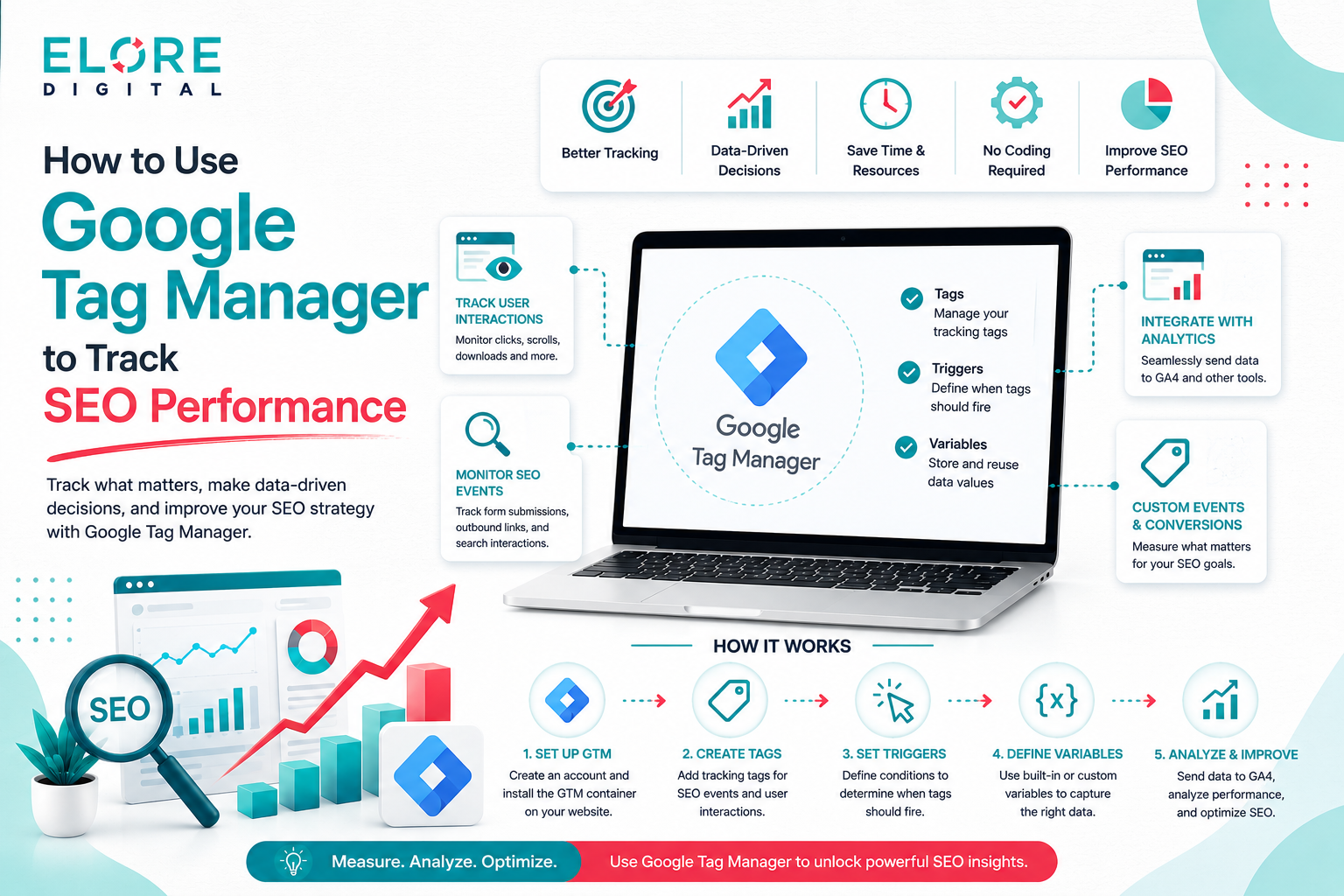
Track smarter, optimize faster—use Google Tag Manager to measure SEO performance and unlock data-driven growth
Google Tag Manager has become an essential tool for marketers who want better control over their website tracking without relying heavily on developers. It allows you to manage tracking codes in one place and helps you understand how users interact with your site. When used correctly, it can provide valuable insights that directly support your SEO strategy. Instead of guessing what works, you can rely on real data to guide your decisions. This makes your optimisation efforts more effective and measurable. In this blog, we will explore how you can use Google Tag Manager to track
SEO performance in a practical and meaningful way.
1. Understanding Google Tag Manager
Google Tag Manager is a tag management system that helps you add and manage tracking codes on your website without editing the code repeatedly. It simplifies the process of implementing analytics and marketing tags. This means marketers can make updates quickly without waiting for technical support. It also reduces the chances of errors that often occur with manual coding. By using one central dashboard, you can manage all your tracking needs efficiently. This makes it an important tool for improving both workflow and data accuracy.
1.1 What is Google Tag Manager
Google Tag Manager is a free tool that allows you to manage different tracking scripts from one platform. Instead of adding code directly to your website, you place a single container and control everything from there. This makes it easier to maintain and update tags. It is widely used by marketers and SEO professionals. It also saves time and reduces dependency on developers. Overall, it makes tracking more accessible.
1.2 How Google Tag Manager Works
Google Tag Manager works through a container that you install on your website. Inside this container, you create tags that collect data based on specific conditions. These conditions are called triggers. When a user performs an action, the trigger activates the tag. This system ensures that data is collected accurately. It also allows you to customise tracking based on your needs.
1.3 Key Components of Google Tag Manager
There are three main components in Google Tag Manager which are tags, triggers, and variables. Tags are used to collect and send data. Triggers decide when a tag should fire. Variables provide additional information that supports both tags and triggers. These elements work together to create a flexible tracking system. Understanding them is essential for using GTM effectively.
1.4 Benefits for SEO Tracking
Google Tag Manager helps track important user actions such as clicks and scroll behaviour. This data is useful for improving content and user experience. It also allows you to make quick updates without affecting your website structure. By using accurate tracking, you can identify what is working and what needs improvement. This supports better SEO decisions.
2. Setting Up Google Tag Manager
Setting up Google Tag Manager is the first step towards tracking your SEO performance. The process involves creating an account, installing the container, and ensuring everything works correctly. A proper setup ensures that your data is reliable from the beginning. If the setup is incorrect, your data may be incomplete or misleading. This is why it is important to follow each step carefully. Once completed, you will have a strong foundation for tracking.
2.1 Creating a Google Tag Manager Account
To start, you need to create an account on Google Tag Manager. You will enter your website name and select your platform. Once done, a container will be created for your site. This container will hold all your tags. It is important to name it clearly so it is easy to manage later. The process is simple and takes only a few minutes.
2.2 Installing the GTM Container Code
After creating the container, you will receive a code snippet. This code needs to be added to your website. One part goes in the header and another in the body. This allows GTM to function properly. Many website platforms support easy installation. Once added, your site is ready for tracking.
2.3 Verifying Installation
Verification ensures that your setup is working correctly. You can use the preview mode in GTM to test your tags. This helps you see if everything is firing as expected. It also helps identify any errors early. This step is important because it prevents incorrect data collection. Always verify before publishing.
2.4 Setting Up Initial Tags
Initial tags help you start collecting basic data such as page views. These are essential for understanding user activity. Setting them up correctly ensures accurate reporting. This is the foundation of all further tracking. Once done, you can move on to more advanced tracking.
3. Tracking SEO Metrics with Google Tag Manager
Tracking SEO metrics allows you to measure how well your website is performing. Google Tag Manager helps you track user interactions that are not always visible in standard analytics. This includes clicks, scroll depth, and form activity. These insights help you understand user behaviour in detail. With this information, you can improve your content and design. This leads to better engagement and improved SEO results.
3.1 Click Tracking
Click tracking helps you see what users are clicking on your website. This includes buttons, links, and navigation items. It shows what attracts user attention. This information helps improve layout and calls to action. With GTM, you can easily set up click tracking. It provides valuable insights into user behaviour.
3.2 Scroll Tracking
Scroll tracking shows how far users scroll on a page. This helps you understand if your content is engaging. If users leave early, it may indicate a problem. GTM allows you to track different scroll levels. This gives a clear view of user interest. It is useful for improving content structure.
3.3 Form Submission Tracking
Form tracking helps measure how many users complete forms on your site. This is important for lead generation. It shows how effective your forms are. GTM allows you to track submissions easily. This helps improve conversion rates. It is a key part of performance tracking.
3.4 Page Performance Tracking
Page performance tracking helps identify which pages perform well. It also highlights pages that need improvement. This data supports better SEO planning. By analysing performance, you can make informed changes. GTM works well with analytics tools for this purpose. It improves overall decision making.
4. Integrating Google Tag Manager with Google Analytics
Integrating Google Tag Manager with Google Analytics allows you to collect and analyse data more effectively. It creates a smooth connection between tracking and reporting. This integration helps you understand user behaviour in depth. It also improves the accuracy of your data. By combining both tools, you get a complete view of your website performance. This is essential for strong SEO strategy.
4.1 Linking Google Tag Manager with Analytics
To link GTM with analytics, you need to add an analytics tag in your container. This ensures that data is sent correctly. The setup process is simple and straightforward. Once linked, you can track user activity easily. This connection is important for accurate reporting.
4.2 Setting Up GA4 Tags
GA4 tags are used to track modern analytics data. They focus on events rather than sessions. GTM makes it easy to add and manage these tags. Proper setup ensures accurate tracking. This helps you understand user behaviour better. It also improves your reporting quality.
4.3 Event Tracking Setup
Event tracking allows you to monitor specific user actions. This includes clicks, downloads, and interactions. GTM provides flexibility in defining these events. This gives deeper insights into how users engage with your site. It helps improve your SEO strategy. Accurate event tracking is very important.
4.4 Analysing Data in Google Analytics
Once data is collected, it needs to be analysed properly. Google Analytics provides reports that show trends and patterns. You can see what is working and what needs improvement. This helps you make better decisions. GTM ensures that the data you analyse is accurate.
5. Advanced Tracking Techniques
Advanced tracking techniques help you go beyond basic metrics. They allow you to collect more detailed data about user behaviour. This helps you refine your SEO strategy. These techniques require careful setup but offer valuable insights. They are useful for businesses that want deeper analysis. When used correctly, they improve overall performance.
5.1 Custom Event Tracking
Custom event tracking allows you to track specific actions that are not covered by default. This includes actions like video views or file downloads. GTM makes it easy to create these custom events. This gives you more control over your data. It helps you understand user behaviour in detail.
5.2 Conversion Tracking
Conversion tracking helps you measure important goals such as purchases or sign ups. It shows how effective your website is. GTM simplifies the process of tracking conversions. This helps improve your return on investment. Accurate conversion data is essential for growth.
5.3 E commerce Tracking
E commerce tracking provides insights into online sales. It tracks user actions such as adding items to cart and completing purchases. GTM supports this type of tracking. This helps businesses improve their sales strategy. It also helps identify areas for improvement.
5.4 Debugging and Testing
Testing ensures that your tags are working correctly. GTM provides tools that help you check your setup. This includes preview mode and debugging options. These tools help you find and fix errors. Proper testing ensures accurate data collection.
6. Best Practices for Google Tag Manager and SEO
Following best practices ensures that your tracking remains accurate and efficient. It helps you manage tags properly and avoid common issues. Good organisation makes your work easier and more reliable. Regular updates ensure that your tracking stays relevant. These practices improve both performance and accuracy. They are essential for long term success.
6.1 Organising Tags and Triggers
Keeping your tags organised helps you manage them easily. Clear naming makes it easier to understand their purpose. This reduces confusion and errors. A well organised setup saves time. It also improves efficiency.
6.2 Regular Audits
Regular audits help ensure that your tracking is accurate. They allow you to remove outdated tags. This keeps your system clean and efficient. Audits also help identify problems early. This prevents incorrect data collection.
6.3 Avoiding Common Mistakes
Common mistakes can affect your data accuracy. These include incorrect triggers or missing tags. Testing helps avoid these issues. Being careful during setup is important. This ensures reliable tracking.
6.4 Optimising Your Tracking Strategy
A good tracking strategy focuses on relevant data. You should track what matters most for your goals. Regular review helps improve your setup. Making small changes can lead to better results. This improves your overall SEO performance.
Conclusion
Google Tag Manager is a powerful tool that helps you track and improve your SEO performance. It allows you to manage tracking codes easily and collect valuable data. By understanding user behaviour, you can make better decisions for your website. Proper setup and integration with analytics ensure accurate results. Advanced tracking techniques provide deeper insights. When used correctly, Google Tag Manager can play a key role in achieving long term SEO success.




Leave A Reply