10 Apr 2026 • 19 Minutes Read
Written by Elore Digital Team
How to Use Google Search Console to Improve SEO
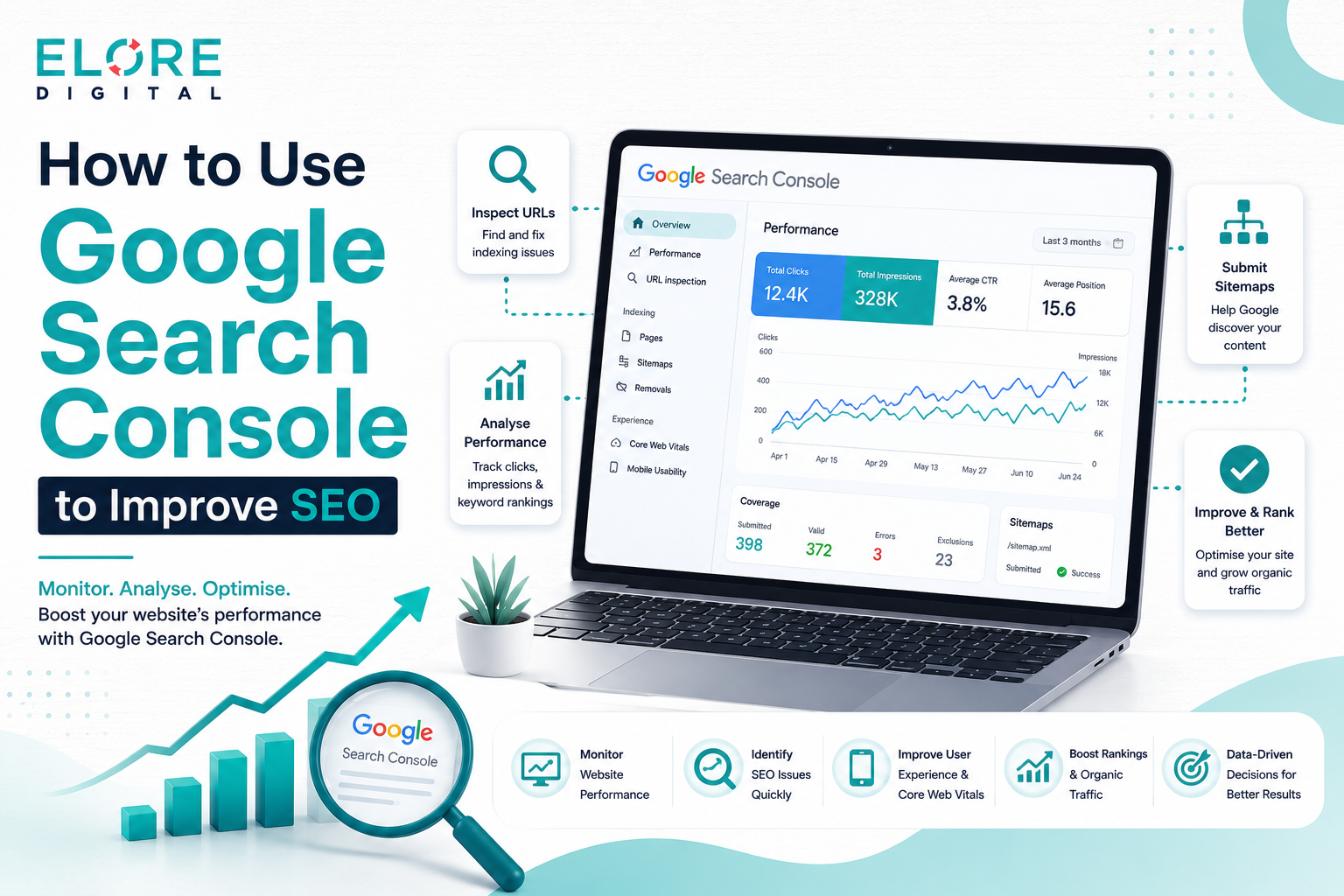
Unlock better rankings with Google Search Console—analyze performance, fix issues, and grow your organic traffic
Google Search Console helps you understand how your website performs in search results and which keywords bring traffic. It allows you to fix technical issues, improve indexing, and monitor your site’s visibility. By analyzing real data, you can optimize your content and improve rankings. Regular use of this tool can significantly increase your organic traffic and overall SEO performance.
1. What is Google Search Console
Google Search Console is a free tool by Google that helps website owners track and improve their presence in search results. It provides data about website performance, keywords, and indexing status. With this tool, you can identify issues and optimize your site for better rankings. It is an essential platform for anyone who wants to grow organic traffic.
1.1 What is Google Search Console
Google Search Console is a free platform created by Google that helps website owners understand how their site performs in search results. It shows important data like which keywords bring visitors, how often your pages appear, and how users interact with your content. This information comes directly from Google, making it highly reliable.Instead of guessing what works, you can use real data to make better decisions. It allows you to monitor your website health, fix issues, and improve your visibility step by step. Whether you run a blog or a business site, this tool gives you a strong foundation for SEO success.
1.2 Why it is Important for SEO
Search engine optimization is all about improving visibility, and that requires accurate insights. Google Search Console provides detailed reports that show what is working and what needs improvement. Without it, you are relying on assumptions instead of facts.It helps you understand user behavior, track keyword performance, and fix technical problems. When you regularly monitor your data, you can make smarter updates that lead to higher rankings and more traffic over time.
1.3 Who Should Use It
Google Search Console is useful for anyone who owns or manages a website. Bloggers can use it to grow their audience, while businesses can use it to attract more customers. It is also valuable for content writers who want to create content that actually ranks.Even beginners can benefit from it because the interface is simple and easy to understand. With consistent use, anyone can learn how to improve their website performance using this tool.
2. Setting Up Google Search Console
Setting up Google Search Console is the first step to tracking and improving your website’s SEO performance. It involves creating an account, adding your website property, and verifying ownership to access your data. Connecting it with tools like Google Analytics provides deeper insights into user behavior. Proper setup ensures accurate tracking, helping you make informed decisions to boost search visibility.
2.1 Creating an Account
Getting started with Google Search Console is simple and does not require technical expertise. You just need a Google account to sign in and access the platform. Once you log in, you can begin adding your website and tracking its performance.The setup process is quick, but it is important to follow each step carefully. A properly configured account ensures that you receive accurate data and insights from the beginning.
2.2 Adding Your Website Property
When adding your website, you can choose between domain property and URL prefix. The domain option gives a complete view of your site across all versions, while the URL prefix option focuses on a specific version.Choosing the right option depends on your needs. For beginners, the URL prefix method is easier, but for long term SEO, the domain property provides more comprehensive data.
2.3 Verifying Ownership
Verification is required to prove that you own the website. Google provides multiple methods such as uploading an HTML file, adding a meta tag, or verifying through DNS settings.
This step is very important because without verification, you cannot access your data. Once verified, your website will start collecting useful insights that you can use to improve SEO.
2.4 Connecting with Google Analytics
Connecting Google Analytics with Search Console allows you to see both search data and user behavior in one place. This combination gives a deeper understanding of how visitors interact with your website.You can track where users come from, what they do on your site, and which pages perform best. This helps you create better content and improve user experience.
3. Overview of the Dashboard
The Overview of the Dashboard in Google Search Console gives a quick snapshot of your website’s overall performance and health. It displays key metrics like total clicks, impressions, coverage issues, and enhancement suggestions. This centralized view helps you identify problems and opportunities at a glance. Regularly checking the dashboard ensures you stay on top of your site’s SEO and user experience.
3.1 Performance Summary
The performance summary is the most important section of the dashboard. It shows total clicks, impressions, click through rate, and average ranking position. These metrics give a clear picture of how your website is performing.By analyzing this data regularly, you can identify trends and understand what is driving traffic. This helps you make better SEO decisions.
3.2 Coverage Report
The coverage report shows which pages are indexed and which have issues. It helps you understand whether Google can access and display your content in search results.If there are errors, they need to be fixed quickly. Ignoring these issues can prevent your pages from ranking and reduce your overall traffic.
3.3 Enhancements
The enhancements section focuses on user experience improvements. It highlights areas such as mobile usability and page performance that affect how users interact with your site.Improving these factors can lead to better engagement and higher rankings. A smooth user experience is essential for long term SEO success.
3.4 Manual Actions and Security Issues
This section alerts you if your website has been penalized or affected by security problems. These issues can significantly impact your rankings and visibility.It is important to address them immediately. Fixing these problems ensures that your site remains trustworthy and accessible to users.
4. Understanding the Performance Report
Understanding the Performance Report in Google Search Console helps you see how your website performs in search results. It provides data on clicks, impressions, average position, and click through rates for your pages and keywords. By analyzing this information, you can identify high performing content and areas that need improvement. Regularly reviewing the report enables you to make informed SEO decisions and boost your organic traffic.
4.1 Clicks and Impressions
Clicks represent how many users visited your site from search results, while impressions show how often your site appeared. Together, these metrics help you understand your visibility.If impressions are high but clicks are low, it means your content needs improvement. You may need to update titles or descriptions to attract more users.
4.2 Click Through Rate
Click through rate shows the percentage of users who clicked your link after seeing it. A low rate means your content is not appealing enough in search results.Improving titles and meta descriptions can increase your click through rate. Small changes can make a big difference in traffic.
4.3 Average Position
Average position tells you where your pages rank in search results. It helps you track your progress and measure the impact of your SEO efforts.By improving your content and fixing issues, you can gradually move your pages to higher positions and attract more visitors.
5. Keyword Optimization Using Search Console
Keyword optimization using Google Search Console helps you identify which keywords are driving traffic to your website. It allows you to discover new opportunities, including long-tail keywords that are easier to rank for. By analyzing clicks, impressions, and rankings, You can optimize existing content through
performance tracking to improve results. Regular keyword optimization ensures your site attracts targeted traffic and achieves better SEO results.
5.1 Finding Keyword Opportunities
Search Console shows keywords that already bring traffic to your site. These keywords are valuable because they indicate what users are searching for.By focusing on these keywords, you can create better content and improve your rankings. It is one of the easiest ways to grow traffic.
5.2 Targeting Long Tail Keywords
Long tail keywords are more specific and less competitive. They attract users who are looking for exact information, which increases the chances of conversion.Using these keywords naturally in your content helps you rank faster and reach a more targeted audience.
5.3 Improving Existing Content
Updating old content is a powerful SEO strategy. You can add new information, improve readability, and include relevant keywords.This not only improves rankings but also keeps your content fresh and useful for readers.
6. Index Coverage Report Explained
The Index Coverage Report shows which pages on your website are indexed by Google and highlights any issues preventing proper indexing. It helps you identify errors, warnings, or excluded pages that could affect your search visibility. By addressing these issues, you ensure that important content appears in search results. Regularly monitoring this report is essential for maintaining a healthy and fully optimized website.
6.1 What is Indexing
Indexing means that Google has stored your page in its database. Only indexed pages can appear in search results.If your pages are not indexed, they will not get traffic. That is why it is important to ensure proper indexing.
6.2 Errors and Warnings
Errors prevent pages from being indexed, while warnings indicate potential problems. Both need attention to maintain a healthy website.Regularly checking this report helps you identify and fix issues before they affect your rankings.
6.3 Fixing Issues
Fixing indexing issues involves resolving errors like broken pages, blocked resources, or server problems. Each issue should be handled carefully.Once fixed, you can request Google to reindex your pages and restore their visibility.
7. URL Inspection Tool
The URL Inspection Tool allows you to check the indexing status and performance of individual pages on your website. It provides detailed information about how Google crawls and views your content. You can use it to request indexing for new or updated pages, speeding up their appearance in search results. Additionally, it helps identify and troubleshoot issues that may affect a page’s SEO performance.
7.1 Checking Index Status
The URL inspection tool allows you to check whether a specific page is indexed. It provides detailed information about how Google sees your page.This helps you understand if your content is accessible and properly optimized.
7.2 Requesting Indexing
When you publish new content, you can use the URL Inspection Tool in Google Search Console to request indexing, which significantly speeds up the process of getting your pages listed in search results. This ensures that Google crawls and evaluates your new or updated content quickly, allowing it to appear in search results sooner than waiting for the normal crawl cycle. It is particularly useful for time-sensitive content, such as news articles, promotions, or seasonal updates, where early visibility can make a big difference in attracting traffic. By proactively requesting indexing, you can maximize exposure, reach your audience faster, and gain a competitive edge in search rankings.
7.3 Troubleshooting Issues
If a page is not performing well in search results, the URL Inspection Tool in Google Search Console helps you pinpoint the exact issues affecting its visibility. It provides detailed information about errors related to crawling, indexing, mobile usability, and structured data, showing you why Google may be struggling to understand or display your page correctly. By carefully analyzing these reports, you can identify problems such as broken links, blocked resources, or slow loading times. Fixing these issues not only improves your page’s chances of ranking higher but also enhances the overall user experience, ensuring that visitors find your content useful and accessible.
8. Improving SEO with Sitemap Submission
Improving SEO with sitemap submission helps search engines discover and index your important pages more efficiently. A sitemap provides a clear structure of your website, making it easier for Google to crawl all relevant content. Submitting and regularly updating your sitemap ensures new and updated pages are indexed quickly. This practice enhances visibility, boosts rankings, and supports overall SEO performance.
8.1 What is a Sitemap
A sitemap is a structured file that contains a comprehensive list of all the important pages on your website. It acts as a roadmap for search engines, helping them understand the organization and hierarchy of your site’s content. By providing this clear structure, a sitemap makes it easier for Google and other search engines to discover, crawl, and index your pages efficiently. This ensures that even newly added or updated content is recognized quickly, improving your chances of appearing in search results and enhancing your overall SEO performance.
8.2 Submitting a Sitemap
You can submit your sitemap through Google Search Console to provide search engines with a clear guide for crawling your website efficiently. This submission helps Google understand which pages are most important, ensuring that no valuable content is overlooked during indexing. By keeping your sitemap up to date and accurate, you make it easier for search engines to discover new pages, updates, and changes on your site. Regularly submitting and monitoring your sitemap improves overall crawl efficiency, accelerates indexing, and ultimately enhances your website’s visibility in search results.
8.3 Best Practices
To maximize the benefits of a sitemap, it’s important to keep it regularly updated and include only the most valuable and relevant pages of your website. Avoid adding duplicate content, thin pages, or low-quality sections, as these can confuse search engines and dilute your SEO efforts. A well-maintained, clean sitemap ensures that Google focuses on crawling and indexing the content that truly matters, improving the visibility of your high-quality pages. Consistently managing your sitemap not only enhances your site’s crawl efficiency but also strengthens overall SEO performance and helps your pages rank higher in search results.
9. Core Web Vitals and Page Experience
Core Web Vitals and page experience measure how users perceive your website’s performance and usability. They focus on loading speed, interactivity, and visual stability, which are important ranking factors for Google. Improving these metrics enhances user satisfaction, reduces bounce rates, and encourages longer visits. Regularly monitoring and optimizing your site’s performance ensures better SEO results and a smoother experience for visitors.
9.1 What are Core Web Vitals
Core Web Vitals are a set of metrics that measure how users experience your website, focusing on critical aspects like loading speed, interactivity, and visual stability. They evaluate how quickly content loads, how responsive the site is to user actions, and whether elements shift unexpectedly while the page is loading. These factors are crucial because they directly impact user satisfaction and engagement; slow or unstable pages can frustrate visitors and increase bounce rates. By optimizing Core Web Vitals, you not only provide a smoother, more enjoyable experience for users but also improve your SEO performance, as Google considers these metrics important ranking factors in search results.
9.2 Importance for SEO
Google places a strong emphasis on user experience as a key ranking factor, meaning that websites that load quickly, respond smoothly, and function reliably are more likely to achieve higher positions in search results. Fast-loading pages reduce frustration, keep visitors engaged longer, and encourage them to explore more content on your site. Improving these performance metrics not only enhances the overall user experience but also signals to search engines that your website is trustworthy and valuable. By focusing on speed, responsiveness, and stability, you can boost your SEO results, increase organic traffic, and create a more positive impression on your audience.
9.3 Improving Performance
You can significantly improve your website’s performance by taking several key steps, such as optimizing images to reduce file sizes without compromising quality, minimizing or removing unnecessary scripts and plugins, and choosing a reliable, fast hosting provider. Optimized images load quicker, scripts that are streamlined prevent delays, and high-quality hosting ensures your server responds promptly to user requests. A fast and well-optimized website not only improves your rankings in search results but also enhances user experience, keeping visitors engaged, reducing bounce rates, and encouraging them to explore more pages. Prioritizing these optimizations creates a smoother, more enjoyable experience for users while strengthening your SEO performance over time.
10. Mobile Usability Optimization
Mobile usability optimization ensures your website provides a smooth and accessible experience on smartphones and tablets. With Google’s mobile-first indexing, a mobile-friendly site is crucial for better search rankings. Optimizing text size, clickable elements, and page speed improves user experience and reduces bounce rates. Regularly testing and fixing mobile issues helps your site reach a wider audience and maintain strong SEO performance.
10.1 Mobile First Indexing
Google now primarily uses the mobile version of your website for indexing and ranking, a practice known as mobile-first indexing. This means that how your site performs on smartphones and tablets directly affects your search visibility and overall SEO performance. If your website is slow, difficult to navigate, or poorly formatted on mobile devices, it can negatively impact rankings and lead to a higher bounce rate. Ensuring your site is fully optimized for mobile including responsive design, readable text, and easy-to-use navigation is essential for providing a positive user experience and maintaining strong search engine performance.
10.2 Fixing Mobile Issues
Common mobile usability issues often include text that is too small to read comfortably, buttons or links that are placed too close together, and pages that load slowly on mobile networks. These problems can frustrate users, cause them to leave your site quickly, and negatively affect your SEO rankings. By addressing these issues—such as increasing font size, spacing interactive elements appropriately, and optimizing page speed—you can significantly improve usability. Enhancing mobile user experience not only keeps visitors engaged longer but also signals to Google that your site is high-quality, helping to boost your search visibility and overall SEO performance.
10.3 Best Practices
To optimize your website for mobile users, it’s essential to use responsive design that automatically adjusts layouts to fit any screen size, from smartphones to tablets and desktops. Keep your layouts simple and uncluttered, so visitors can easily navigate and find information without confusion. Ensure that pages load quickly by optimizing images, minimizing heavy scripts, and leveraging fast hosting. Additionally, make sure your content is easy to read, with clear fonts, adequate spacing, and properly formatted text. Implementing these practices not only improves user experience but also helps you reach a wider audience, keep visitors engaged longer, and enhance your SEO performance across all devices.
11. Internal Linking and SEO Insights
Internal linking and SEO insights help search engines understand the structure of your website and the importance of each page. By linking related content, you can distribute page authority and improve rankings across your site. It also enhances user navigation, keeping visitors engaged longer. Regularly analyzing internal links with Search Console ensures your website remains organized and optimized for SEO.
11.1 Using Search Console Data
Google Search Console allows you to identify your website’s top-performing pages by showing which content attracts the most clicks and impressions. By analyzing this data, you can strategically create strong internal links from high authority pages to other relevant pages on your site. This not only improves site navigation, making it easier for visitors to find related content, but also helps search engines understand the hierarchy and structure of your website. Proper internal linking distributes page authority effectively, boosts SEO performance, and ensures that both users and search engines can navigate your site more efficiently.
11.2 Improving Page Authority
Internal linking is a powerful SEO strategy that distributes authority, or “link juice,” across your website by connecting high-performing pages with other relevant, weaker pages. When strong, authoritative pages link to less visible or newer content, they pass on credibility and ranking potential, helping those pages gain visibility in search results. This not only improves the overall SEO performance of your site but also ensures that all important pages are discoverable by both users and search engines. Consistently building a thoughtful internal linking structure enhances site navigation, boosts page authority, and contributes to higher rankings across multiple pages.
12. Fixing Technical SEO Issues
Fixing technical SEO issues is essential to ensure search engines can crawl and index your website effectively. It involves resolving crawl errors, broken links, and duplicate content that can harm your rankings. Properly addressing these problems improves site performance, user experience, and overall SEO health. Regular technical audits help maintain a strong foundation for long-term search visibility.
12.1 Crawl Errors
Crawl errors happen when search engines like Google are unable to access certain pages on your website, preventing them from being properly indexed. These errors can occur due to broken links, server issues, or incorrect robots.txt settings, and they can significantly impact your site’s visibility in search results. If left unresolved, crawl errors may cause important pages to be omitted from Google’s index, reducing organic traffic and limiting your SEO potential. Regularly monitoring and fixing crawl errors ensures that all your valuable content is accessible to search engines, helping maintain strong rankings and a fully optimized website.
12.2 Broken Links
Broken links, whether internal or external, create a frustrating experience for users and signal to search engines that your website may be poorly maintained. When visitors click on a link that leads to a missing page, it increases bounce rates and reduces engagement, negatively impacting your SEO performance. Regularly auditing your site to identify and either fix or remove broken links ensures a smoother navigation experience and preserves the authority of your pages. Maintaining clean, functional links not only improves user trust and satisfaction but also strengthens your website’s overall quality, helping search engines crawl and index your site more effectively.
12.3 Duplicate Content
Duplicate content occurs when the same or very similar content appears on multiple pages of your website or across different websites. This can confuse search engines, making it difficult for them to determine which version to rank, and may result in lower visibility or even penalties. Keeping your content unique and original ensures that each page has its own value, making it easier for search engines to index and rank your site appropriately. By consistently producing distinctive content, you improve your website’s credibility, attract more organic traffic, and enhance overall SEO performance.
13. Monitoring Backlinks with Search Console
Monitoring backlinks with Google Search Console helps you understand which websites are linking to your content and how they impact your SEO. It allows you to identify high-quality links that boost your site’s authority and trustworthiness. At the same time, you can spot harmful or spammy links that may hurt your rankings and take action to remove them. Regularly reviewing your backlink profile ensures your site maintains a strong and healthy SEO presence.
13.1 External Links Report
The External Links report in Google Search Console provides a detailed overview of which websites are linking to your content, helping you understand your backlink profile. Backlinks are a critical factor in SEO because they serve as votes of confidence from other sites, signaling trust and credibility to search engines. High-quality backlinks from authoritative websites can significantly boost your domain authority and improve your rankings in search results. By regularly monitoring this report, you can identify valuable link opportunities, strengthen relationships with other sites, and ensure your website maintains a strong and credible presence online.
13.2 Identifying Quality Links
Not all backlinks carry the same value for SEO, so it’s important to focus on acquiring links from trusted, authoritative, and relevant websites within your niche. Links from high-quality sources signal to search engines that your content is credible and trustworthy, which can significantly boost your rankings. Low-quality or spammy backlinks, on the other hand, can harm your SEO and even lead to penalties. By prioritizing quality over quantity and building relationships with reputable sites, you can strengthen your backlink profile, improve your website’s authority, and achieve long-term SEO success.
13.3 Removing Harmful Links
Spammy or low quality backlinks can seriously harm your SEO by signaling to search engines that your website is untrustworthy or engaging in manipulative practices. These harmful links can lead to ranking penalties and reduce the visibility of your valuable content. It is crucial to regularly monitor your backlink profile, identify any suspicious or irrelevant links, and take steps to remove or disavow them. Maintaining a clean, high-quality backlink profile not only protects your site’s reputation but also strengthens its authority, helping search engines recognize your website as a reliable and credible source.
14. Using Search Console for Content Strategy
Using Google Search Console for content strategy helps you make data-driven decisions to improve your website. It allows you to identify content gaps, discover keywords with high impressions but low clicks, and find opportunities to create new articles. Updating and optimizing existing content based on this data can boost rankings and attract more traffic. Regularly analyzing performance ensures your content stays relevant and continues to drive results over time.
14.1 Finding Content Gaps
Google Search Console allows you to identify keywords that generate impressions but receive few or no clicks, highlighting areas where your content could be more engaging. These keywords represent untapped opportunities, showing what users are searching for but not finding compelling enough to click on your pages. By analyzing these gaps, you can optimize your titles, meta descriptions, and content to better match user intent and encourage more clicks. Addressing these opportunities helps attract targeted traffic, improves user engagement, and ultimately boosts your website’s SEO performance.
14.2 Updating Old Content
Refreshing old content is a powerful SEO strategy that helps keep your website relevant, accurate, and valuable to visitors. Over time, information can become outdated, links may break, or search trends may shift, making it essential to revisit and update existing articles. By adding new insights, updating statistics, improving readability, and optimizing for current keywords, you can enhance the page’s authority and user engagement. Regularly updating your content not only maintains its usefulness for readers but also signals to search engines that your site is active and authoritative, which can improve rankings and drive sustained organic traffic over time.
14.3 Tracking Progress
Tracking your website’s performance using tools like Google Search Console is essential for measuring the effectiveness of your SEO efforts. By monitoring key metrics such as clicks, impressions, average position, and click through rates, you can identify which strategies are working and which areas need improvement. This data driven approach allows you to make informed decisions, optimize underperforming pages, and enhance content that resonates with your audience. Continuously tracking and analyzing performance not only helps refine your SEO strategy but also ensures sustained growth, better user engagement, and higher search rankings over time.
15. Common Mistakes to Avoid
When using Google Search Console, many website owners make avoidable mistakes that can hurt SEO performance. Ignoring the data, not fixing technical errors, and overlooking mobile optimization are common issues. Failing to monitor indexing problems or broken links can also reduce traffic and rankings. Being aware of these mistakes and addressing them promptly ensures your website performs at its best in search results.
15.1 Ignoring Data
Many website owners collect valuable data from tools like Google Search Console but fail to act on it, missing opportunities to improve their SEO. Simply gathering information is not enough; it’s crucial to analyze the data carefully to understand trends, identify weaknesses, and uncover opportunities for growth. Taking action based on these insights such as optimizing underperforming pages, targeting new keywords, or fixing technical issues directly impacts your site’s search visibility. Consistently applying data-driven strategies is key to improving SEO, increasing organic traffic, and maintaining a competitive edge in search rankings.
15.2 Not Fixing Errors
Technical SEO issues should never be overlooked, as even small problems can have a significant impact on your website’s search rankings and overall performance. Issues such as broken links, slow page speeds, crawl errors, or improperly configured redirects can prevent search engines from properly indexing your pages, reducing your visibility in search results. Regularly auditing your site to identify and fix these technical problems ensures that your website remains accessible, user-friendly, and optimized for search engines. By addressing even minor issues promptly, you protect your rankings, enhance user experience, and create a strong foundation for long-term SEO success.
15.3 Ignoring Mobile Optimization
Mobile users now make up a significant portion of online traffic, with most people accessing websites via smartphones and tablets. Ignoring mobile optimization can limit your reach, frustrate visitors, and lead to higher bounce rates, ultimately hurting your SEO performance. Ensuring that your website is fully responsive, loads quickly, and provides a smooth and intuitive experience on all mobile devices is essential. By prioritizing mobile optimization, you not only cater to the majority of your audience but also improve search engine rankings, enhance user engagement, and expand your site’s overall reach and effectiveness.
16. Advanced Tips for Better SEO Results
Advanced tips for better SEO results go beyond basic optimization and help you stay ahead of competitors. Combining Google Search Console with other SEO tools gives deeper insights into your website’s performance. Automating reports saves time while keeping you updated on important metrics. Additionally, monitoring competitors allows you to identify gaps and refine your strategy for higher rankings and more traffic.
16.1 Combine Tools
Using multiple SEO tools together provides a more comprehensive understanding of your website’s performance than relying on a single platform alone. By combining Google Search Console with other tools such as Google Analytics, keyword research platforms, and backlink checkers, you gain deeper insights into traffic patterns, user behavior, keyword opportunities, and site authority. This multi-tool approach allows you to cross-verify data, identify trends, and uncover areas that need improvement with greater accuracy. Integrating insights from various sources helps you refine your SEO strategy, make informed decisions, and implement changes that can significantly boost your search rankings and overall online visibility.
16.2 Automate Reports
Automation in SEO saves time and ensures that you stay consistently updated on your website’s performance without having to manually gather and analyze data. By setting up automated reports and alerts through tools like Google Search Console, you can monitor key metrics such as clicks, impressions, indexing issues, and backlinks effortlessly. This allows you to quickly identify trends, spot potential problems, and respond promptly without being bogged down by repetitive tasks. With routine tracking handled automatically, you can focus more on improving your content, optimizing user experience, and implementing strategic changes that drive higher rankings and increased organic traffic over time.
16.3 Monitor Competitors
Analyzing your competitors is a crucial aspect of a strong SEO strategy, as it allows you to learn from their successes and identify areas where your website can improve. By examining competitor content, keywords, backlink profiles, and site structure, you can uncover gaps in your own strategy and discover opportunities to create better, more valuable content for your audience. This process helps you understand what resonates with users, what drives engagement, and which tactics are effective in your niche. Leveraging these insights not only strengthens your content and SEO approach but also gives you a competitive advantage, enabling your website to attract more traffic, rank higher in search results, and outperform rivals over time.
Conclusion
Google Search Console is essential for improving SEO as it provides valuable insights and helps you identify and fix issues on your website. By using it regularly, you can make informed decisions that lead to better search rankings and increased organic traffic. Focus on creating quality content, enhancing user experience, and addressing technical improvements while letting the data guide your strategy. Consistency in monitoring and optimizing your site is key to long-term success. When used properly, Google Search Console becomes a powerful tool that supports sustainable growth and helps you build a strong online presence, so start leveraging it today to maximize your website’s potential.


Leave A Reply